Docs › Getting started
Connecting Your Channels
Connect WhatsApp, Instagram and Facebook to Vaanexa from Settings so all customer messages come into one Inbox.
A channel is a messaging app that your customers use to contact your business. When you connect a channel to Vaanexa, all messages from that channel arrive in your Vaanexa Inbox, so your team can respond to every customer from one place.
Vaanexa supports the following channels:
All channels are connected through Meta, using the Facebook account that manages your business.
Before you begin
Ensure that you have the following:
- Access to the Facebook account that owns or manages your business.
- A WhatsApp Business Account, if you are connecting WhatsApp.
- An Instagram professional account linked to your Facebook Page, if you are connecting Instagram.
Open the channels page
- In the left menu, click Settings.
- Under Channels, click WhatsApp, Instagram & Facebook.
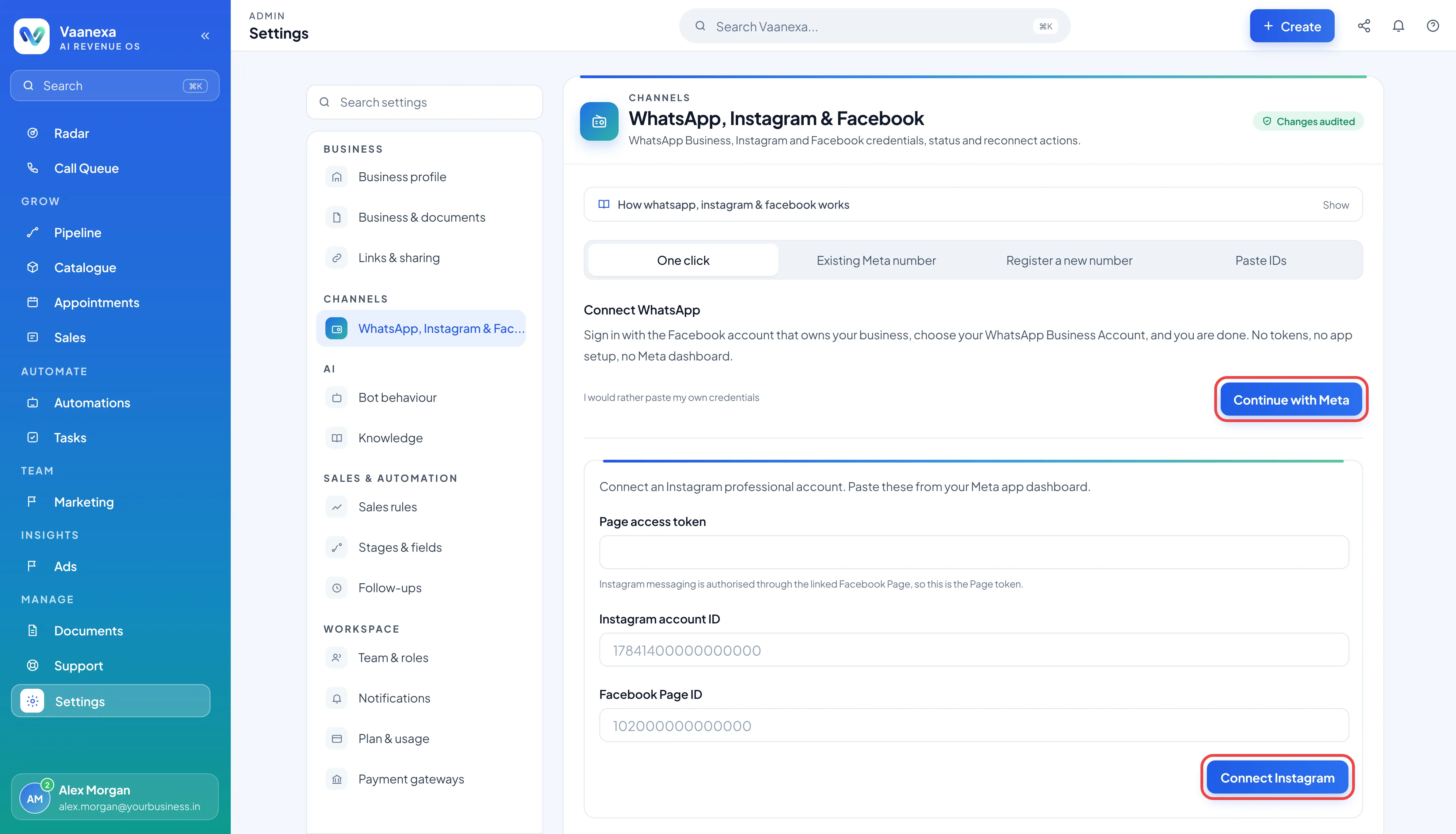
Connect WhatsApp
- In the WhatsApp section, select the One click tab.
- Click Continue with Meta.
- Sign in with the Facebook account that owns your business.
- Select your WhatsApp Business Account and follow the steps provided by Meta.
Once the steps are complete, WhatsApp is connected. No tokens, app setup or Meta dashboard configuration are required.
Connect Instagram
- In the Instagram section, click Connect Instagram.
- Sign in with the Facebook account linked to your Instagram professional account.
- Follow the steps provided by Meta to authorise the connection.
Once the steps are complete, Instagram messages begin to arrive in your Inbox.
Connect Facebook
In the Facebook section, click the connect button and follow the steps provided by Meta to select your Facebook Page.
Check your channel status
Each channel displays its current status on this page:
| Status | Description |
|---|---|
| Connected (green) | The channel is connected. The account name or number is displayed below the status, for example @yourbusiness or +91 98765 43210. |
| Disconnected (orange) | The channel is not working. Vaanexa displays the reason below the status. |
Reconnect a channel
If a channel displays Disconnected, open its section on the WhatsApp, Instagram & Facebook page and repeat the connection steps for that channel.
What's next
With your channels connected, invite your team to Vaanexa.
FAQ and Troubleshooting
Why does my channel display Disconnected?
A channel may become disconnected if its access has expired or been revoked, or if Meta has restricted the account. Review the message displayed below the status to identify the reason, and then reconnect the channel.
Will I lose my chats and leads if I reconnect?
No. If you reconnect the same account or Facebook Page, all your existing chats and leads are retained.
Can I connect more than one channel?
Yes. You can connect WhatsApp, Instagram and Facebook to the same Vaanexa account, and all messages arrive in a single Inbox.